
Home / Reviews / Head-to-head
UniFi G5 Turret Ultra vs Reolink E1 Pro: Which Should You Buy?

Affiliate note: Bestindoorcam.com may earn a commission if you buy through a store link. That does not change which camera we prefer. Read how affiliate links and ads work and how we research and review cameras.
TL;DR: The UniFi G5 Turret Ultra ($129.00 at Ubiquiti's US store, $151.00 with surcharges included) and the Reolink E1 Pro ($66.49 at reolink.com, checked October 28, 2026; list price $69.99) are both subscription-free cameras, but they belong to different worlds. The UniFi is a fixed, weatherproof 2K PoE turret that records only inside the UniFi Protect ecosystem — it needs a Protect console or NVR, has no Wi-Fi, no on-camera storage and no speaker, and in exchange gives you 30 m infrared, an IP66 metal-and-polycarbonate body and people/vehicle/animal detection on a wired connection that never drops. The Reolink is a plug-in indoor pan-tilt that does almost everything itself: higher-resolution 3K video, motorised 355°/50° movement with auto-tracking, two-way talk, baby-crying detection and microSD recording up to 512GB over dual-band Wi-Fi (or Ethernet, data only). Buy the UniFi if you already run — or plan to run — UniFi Protect and want a fit-and-forget camera for a porch, garage or large room. Buy the Reolink if you want one flexible indoor camera that works standalone, follows the action and costs half as much before you count the UniFi console it requires. All specs below are from Ubiquiti's and Reolink's official pages, checked October 28, 2026; we have not hands-on tested either camera.
Overview
This is the prosumer-versus-value fight, and the first thing to understand is that the price gap is bigger than it looks. The E1 Pro's $66.49 is the whole purchase: plug it in, add a microSD card if you want local recording, and it works. The G5 Turret Ultra's $129.00 is the camera only — Ubiquiti's tech specs list no on-camera storage slot and no standalone recording mode, so the camera is adopted, managed and recorded by a UniFi Protect console or NVR that you buy separately. If you already own that console, the UniFi is a $129 add-on to a system you trust. If you do not, the honest comparison is console-plus-camera against a $66.49 camera, and it is not close. If you want the single-product breakdowns first, read our UniFi G5 Turret Ultra review and our Reolink E1 Pro review — this page is the head-to-head.
The second thing to understand is placement. The Turret Ultra is an indoor/outdoor camera: IP66 weatherproofing, IK04 tamper resistance and a −30 to +50°C operating range mean the same unit can watch a living room, a garage or a covered porch. The E1 Pro is indoor-only and not waterproof, with a −10 to +55°C range — it is a room camera, full stop. They overlap in exactly one place, a fixed indoor viewpoint, and even there they solve it differently: the UniFi is aimed once, by hand, at install time, while the Reolink's motor keeps moving it for you.
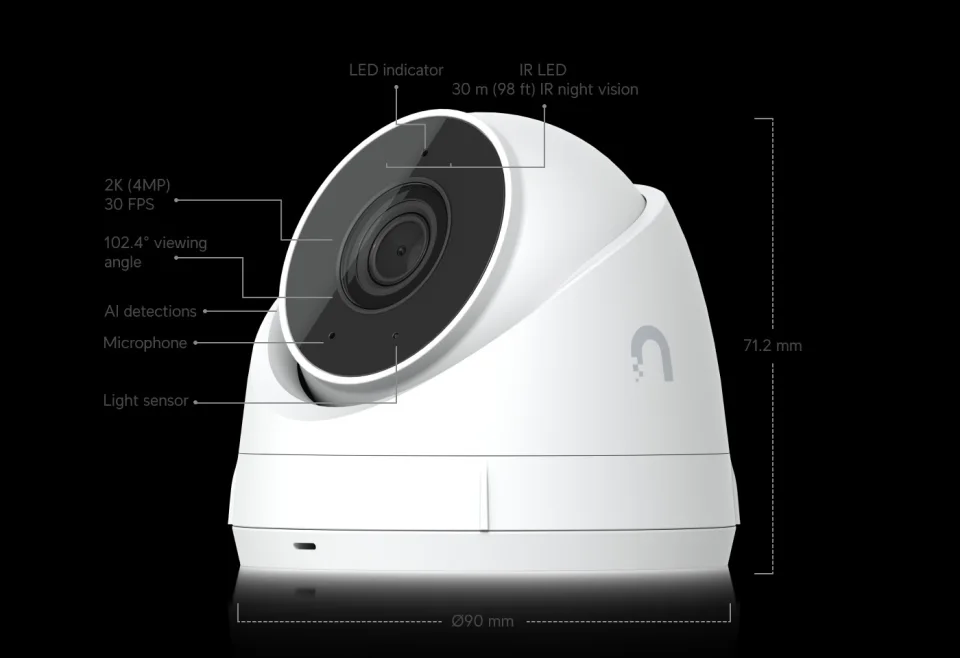
One framing note before the table: neither camera charges a subscription for its core recording — Protect records on your own UniFi hardware, and the E1 Pro records on its own card, a Reolink NVR or Home Hub, or FTP/NAS. The money question on both sides is hardware, not monthly fees.
Full specification comparison
| Spec | UniFi G5 Turret Ultra | Reolink E1 Pro (current 3K version) |
|---|---|---|
| Price (official US store, checked Oct 28, 2026) | $129.00 at store.ui.com ($151.00 surcharges incl. shown on the same listing) | $66.49 at reolink.com (list price $69.99) |
| Model | UVC-G5-Turret-Ultra (white) / UVC-G5-Turret-Ultra-B (black) | E1 Pro, current 3K 5MP version (see version warning below) |
| Video resolution | 2K 4MP, 2688 × 1512 (16:9), up to 30 fps | 3K 5MP, 2880 × 1616 at 20 fps |
| Sensor / lens | 1/2.4″ CMOS, fixed focal length | 1/2.7″ CMOS, f = 4.0 mm fixed, F1.6, IR-cut |
| Field of view | H 102.4° / V 54.9° / D 120.6° | Not published in Reolink's current US spec tab — none quoted |
| Movement | Fixed turret; manual 3-axis adjustment at install (Ubiquiti's product graphic: pan 360° / tilt 75° / rotate 360°). No motor, no tracking | Motorised pan 355° / tilt 50°, pan auto-tracking, 1 guard position + up to 64 presets |
| Night vision | Built-in IR LED + IR cut filter, up to 30 m (98 ft) | IR up to 12 m (40 ft), 850 nm, auto-switching with IR-cut filter |
| Smart detection | People, vehicles and animals (per Ubiquiti tech specs) | Motion, human, pet and baby-crying detection |
| Audio | Microphone only — no speaker in Ubiquiti's tech specs, so no two-way talk | Two-way talk, built-in microphone and speaker |
| Connection | Wired only: 10/100 MbE RJ45, PoE (37–57V DC, max 4W). No Wi-Fi | Dual-band 2.4/5 GHz Wi-Fi (802.11ac/a/b/g/n, WPA/WPA2) plus a 10/100 Mbps RJ45 Ethernet port for data only — Reolink's FAQ states the port is not PoE |
| Recording / storage | No on-camera storage. Records to a UniFi Protect console or NVR (required, sold separately); no subscription for recording on your own Protect hardware | microSD up to 512GB (not included; Reolink estimates up to 16 days continuous at the default bitrate), Reolink NVR, Home Hub series, FTP/NAS; motion, scheduled and 24/7 recording; time lapse |
| Platform / ecosystems | UniFi Protect only — no Alexa, Google or HomeKit support listed | Reolink app, Google Assistant and Alexa; RTSP/ONVIF for third-party recorders |
| Weather / tamper rating | IP66 weatherproof, IK04 tamper-resistant; indoor or outdoor | Indoor only, not waterproof |
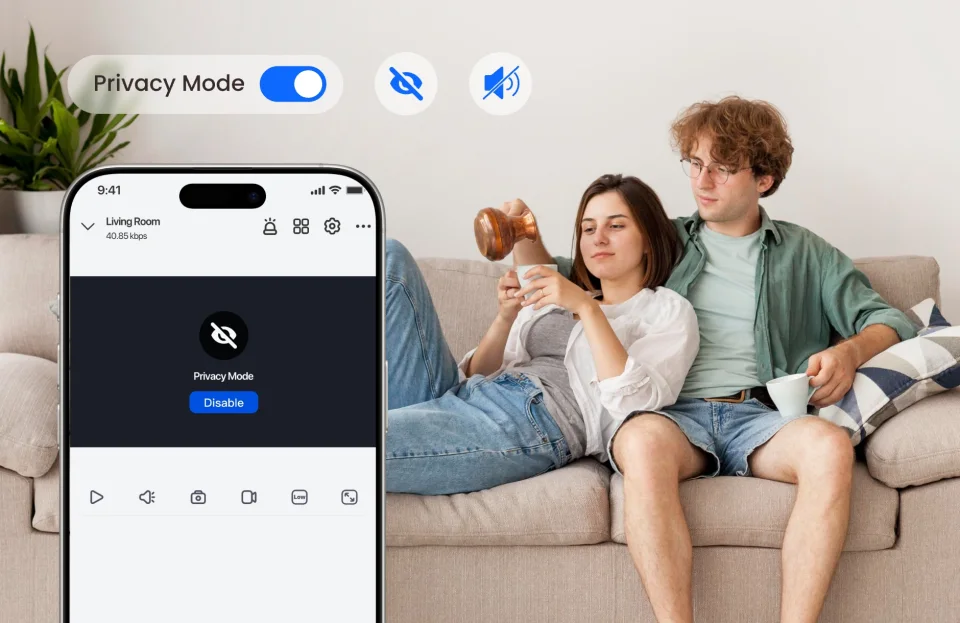
| Privacy | Protect-managed; the camera itself has no physical privacy shutter or privacy mode listed | Privacy Mode listed in Reolink's specs |
| Power | PoE only, max 4W | DC 5.0V/1A plug-in, corded; no battery |
| Dimensions / weight | Ø90 × 71.2 mm; 330 g; aluminium alloy + UV-stabilised polycarbonate | Φ84 × 118 mm; 235 g |
| Operating temperature | −30 to +50°C | −10 to +55°C, indoor use |
| Mounting | Wall/ceiling surface mount included; junction box and arm mount optional | Tabletop or wall/ceiling mount |
| Compliance / warranty | NDAA compliant; CE, FCC, IC | 2-year limited warranty |
Source note: specs and prices verified October 28, 2026 against Ubiquiti's official tech specs (techspecs.ui.com) and US store listing, and Reolink's official US product page and specifications tab for the E1 Pro. Three honesty flags: Ubiquiti's own store listing shows both $129.00 and $151.00 (“Surcharges incl.”) for the Turret Ultra, so both figures are reported rather than one picked silently. Reolink's spec tab lists 10 IR LEDs while its own page gallery diagram labels 8 — the consistent 40 ft range is what this comparison relies on. And Reolink does not publish a field of view for the current E1 Pro, so none is quoted; the older 4MP version's angles belong to a different model.
Video and night vision: resolution vs reach
On headline numbers the Reolink wins video: 2880 × 1616 (5MP) against the UniFi's 2688 × 1512 (4MP), with a fast F1.6 lens that Reolink says admits roughly twice the light of a standard F2.0 lens — a brand claim, attributed as such. The UniFi answers with frame rate and a published field of view: 30 fps against the E1 Pro's 20 fps main stream, and a documented 102.4° horizontal / 120.6° diagonal view, where Reolink publishes no angle of view at all for the current model. In practice both are sharp room cameras; the E1 Pro gives you more pixels per frame, the UniFi smoother motion and a view angle you can plan a room around before you buy.
At night the ranking flips, and it is not close. The Turret Ultra's infrared reaches 30 m (98 ft) — two and a half times the E1 Pro's 12 m (40 ft). Inside a normal room both ranges are more than enough, which is why the Reolink's figure is not the weakness it appears to be; but in a garage, a long hallway, a warehouse corner or any outdoor spot, the UniFi keeps seeing long after the Reolink's picture has gone dark. Neither camera offers colour night vision or a spotlight: both are infrared-only at night.
Coverage: a motor that follows vs a turret you aim once
This is the deepest functional split in the comparison. The E1 Pro is a true pan-tilt camera: 355° of pan and 50° of tilt, driven from the app, with pan auto-tracking that follows a person or pet across the room, a guard position it returns to, and up to 64 preset viewpoints. One E1 Pro can take turns watching a door, a crib and a pet's bed. The Turret Ultra cannot move at all once installed. Its ball sits in a 3-axis mount that Ubiquiti's product graphic describes as pan 360° / tilt 75° / rotate 360° — that is the range you can aim it through, by hand, on the ladder, at install time. After that the view is fixed, and what falls outside its 102.4° horizontal angle is simply not recorded.
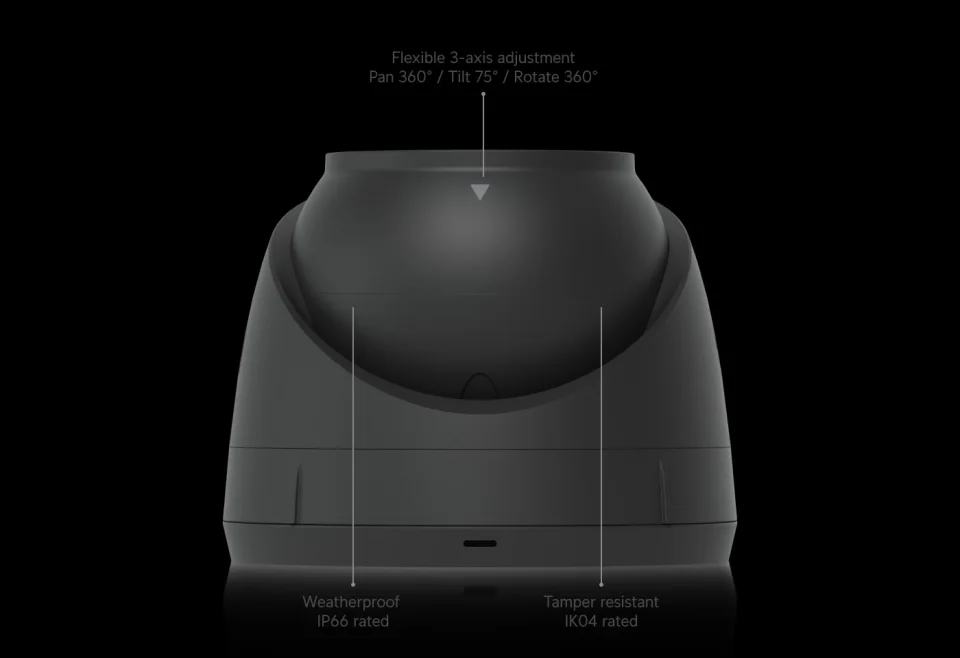
Neither approach is a flaw; they are different security philosophies. A fixed camera records the same important view continuously, with no motor to wear, no tracking mistakes and no moment where the lens is pointed the wrong way. A pan-tilt covers more area with one device but is always a compromise in progress — while it follows the dog, it is not watching the door. Buyers choosing between these two should decide this section first, because no firmware update will ever move the UniFi or bolt the Reolink down. We ran the same coverage question through a different UniFi pairing in our UniFi G5 Flex vs Reolink E1 Pro comparison.
Detection and audio
Detection lists are tailored to each camera's world. The Turret Ultra detects people, vehicles and animals — a list written for driveways, garages and yards as much as living rooms, and notably it includes vehicles, which the indoor-focused E1 Pro does not list. The E1 Pro detects motion, humans and pets, and adds the detection the UniFi lacks entirely: baby crying, which makes it the only one of the two that can serve as a nursery alert camera. Both cameras run their detection on-device as part of their platforms; neither charges for smart alerts as an add-on subscription in the way the doorbell brands do.
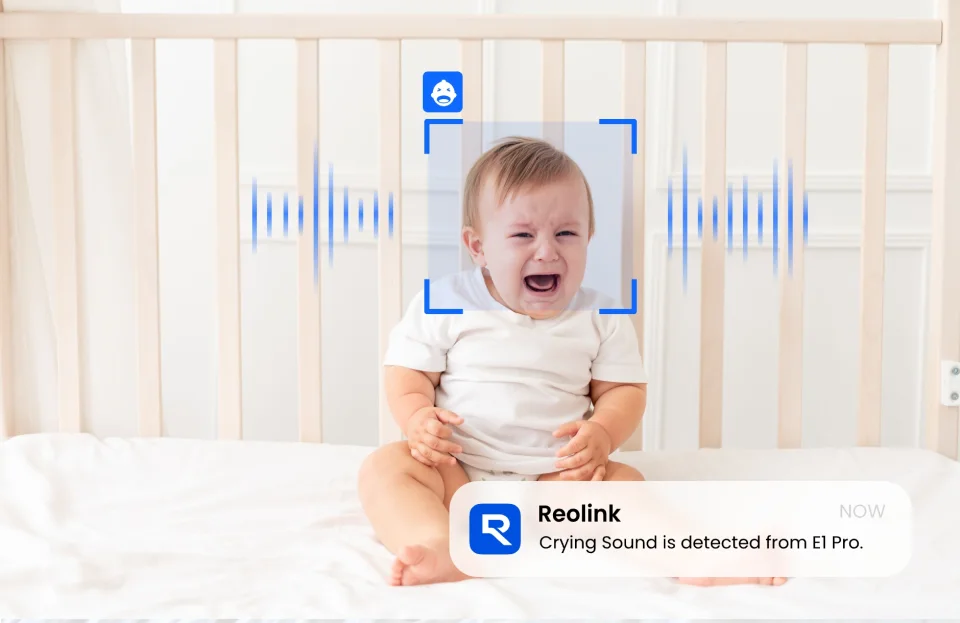
Audio is a clean Reolink win. The E1 Pro has a built-in microphone and speaker for genuine two-way talk — talk to kids, soothe a pet, or warn off a stranger from the app. The Turret Ultra's official tech specs list a microphone only: it records audio with its video, but there is no speaker and therefore no way to speak through it, whatever some retailer listings imply. If talking through the camera is on your list, this comparison is already over.
Recording, storage and the platform question
The E1 Pro is deliberately recorder-agnostic. It records to its own microSD card (up to 512GB; Reolink estimates up to 16 days of continuous recording at the default 3072 Kbps bitrate), to a Reolink NVR or Home Hub, or to FTP/NAS storage, and it speaks RTSP and ONVIF for third-party systems. It works on day one with nothing else in the house. The Turret Ultra is the opposite: no card slot, no RTSP-style openness in its official specs — it records only to a UniFi Protect console or NVR, inside Ubiquiti's software, full stop. Protect is a polished, subscription-free platform once you own the hardware, and for households already running UniFi networking gear it is a genuine ecosystem advantage. For everyone else it is a lock-in you should choose with your eyes open: a Turret Ultra without a Protect console records nothing.
Connections follow the same pattern. The UniFi is wired-only PoE: one Ethernet cable carries power and data, the connection cannot be jammed or dropped by a busy Wi-Fi band, and the camera draws at most 4W. The price of that reliability is the cable run itself. The E1 Pro defaults to dual-band Wi-Fi, with a wired Ethernet port as a data-only fallback — Reolink's own FAQ is explicit that the port does not accept PoE, so the camera still needs its 5V power supply even when wired. How the two Reolinks in this family split on exactly these points is covered in our Reolink E1 Pro vs Reolink E1 comparison.
Privacy and everyday use
The E1 Pro lists a Privacy Mode in its official specs — a software off-switch for times when the camera should not be watching the room it lives in, which matters for a device that sits in bedrooms and living rooms and can move. The Turret Ultra's official specs list no privacy shutter or privacy mode; in Protect you manage it as part of a fixed surveillance system, which suits its install-and-forget role but offers no equivalent one-tap “stop watching us” designed for family rooms.
Everyday friction differs too. The Reolink is a 235 g tabletop camera you can reposition in seconds and control with Google Assistant or Alexa. The UniFi is a 330 g screwed-down turret that disappears into a UniFi dashboard alongside your network gear — no voice-assistant support is listed, and repositioning means tools. One is an appliance; the other is infrastructure.
Pros and cons
UniFi G5 Turret Ultra
Pros
- 30 m (98 ft) infrared night vision — two and a half times the E1 Pro's reach
- IP66 weatherproof and IK04 tamper-resistant, −30 to +50°C: the same camera works indoors, in garages and outdoors
- Wired PoE connection (max 4W) that Wi-Fi congestion cannot drop; NDAA compliant
- Vehicle detection alongside people and animals — a list built for more than living rooms
- 30 fps video and a fully published field of view (102.4° H / 120.6° D) you can plan around
- No subscription: Protect records on your own console or NVR
Cons
- Requires a UniFi Protect console or NVR (sold separately) — it records nothing standalone, and the true system price starts well above $129
- Fixed view: manual aim at install, no motorised pan-tilt and no auto-tracking
- Microphone only — no speaker, so no two-way talk
- No Wi-Fi and no on-camera storage; a cable run is mandatory
- Ubiquiti's own listing shows $151.00 with surcharges included on top of the $129.00 headline price
Reolink E1 Pro
Pros
- Costs about half the UniFi's camera-only price ($66.49 checked October 28, 2026) and works standalone out of the box
- Higher-resolution 3K 5MP video with an F1.6 lens
- Motorised 355°/50° pan-tilt with auto-tracking, guard position and up to 64 presets
- Two-way talk and baby-crying detection — both absent on the UniFi
- microSD up to 512GB plus NVR, Home Hub, FTP/NAS and RTSP/ONVIF recording options; Privacy Mode
- Dual-band Wi-Fi with an Ethernet data port as backup; Alexa and Google Assistant support
Cons
- Indoor only and not waterproof — no garage-door, porch or outdoor use
- Night vision reaches 12 m (40 ft) against the UniFi's 30 m
- 20 fps main stream, and Reolink publishes no field of view for this model
- Ethernet port is data only (no PoE), so a power outlet is still required nearby
- Version trap: an older 4MP E1 Pro is still listed in places — check you are getting the current 3K 5MP model (2880 × 1616, Φ84 × 118 mm)
Who should buy which?
Buy the UniFi G5 Turret Ultra if you already run UniFi Protect, or are building a wired camera system and want this viewpoint covered permanently: a garage, a large open-plan room, a covered porch or anywhere weather, distance or Wi-Fi dead zones rule out a plug-in camera. Its 30 m infrared, IP66 body and PoE reliability are things the Reolink simply does not offer at any setting. Accept, before you buy, the fixed view, the listen-only audio and the console requirement.
Buy the Reolink E1 Pro if you want one indoor camera that handles a whole room by itself: following pets, checking a nursery with crying alerts, talking through the camera, and recording locally with no extra hardware and no subscription. It is the better camera for most homes, at about half the price, and it is not close unless the UniFi's specific strengths — weatherproofing, wired PoE, long-range infrared, Protect integration — are exactly what your situation demands.
Skip both if you need colour night vision or a spotlight (neither has one), a battery camera (both are powered), or Apple HomeKit (neither lists it). Our guide to the best indoor security cameras covers the wider field, including the colour-night-vision and HomeKit options.
FAQ
Does the UniFi G5 Turret Ultra work without a UniFi Protect console?
No. Ubiquiti's tech specs list no on-camera storage and no standalone recording mode: the camera is adopted and recorded by a UniFi Protect console or NVR, which is sold separately. The $129.00 camera price is not a working system price. The E1 Pro, by contrast, records to its own microSD card with nothing else required.
Can the Reolink E1 Pro be powered over Ethernet (PoE)?
No. The E1 Pro has a 10/100 Mbps RJ45 port, but Reolink's own FAQ states it is for data only and does not support PoE — the camera always needs its DC 5.0V/1A power supply. The Turret Ultra is the opposite: PoE is its only power method.
Which camera is better at night?
The UniFi, on reach: its infrared is rated to 30 m (98 ft) against the E1 Pro's 12 m (40 ft). Inside a typical room both are sufficient, and the E1 Pro's F1.6 lens gathers more light in mixed lighting. In large or outdoor spaces the UniFi's infrared range is the decisive advantage. Neither camera offers colour night vision.
Which E1 Pro should I make sure I am buying?
The current 3K 5MP version: 2880 × 1616, F1.6 lens, Φ84 × 118 mm, 235 g, microSD up to 512GB. An older 4MP E1 Pro (2560 × 1440, F2.4, smaller body, smaller card ceiling) still appears on regional pages and third-party listings at similar prices. Reolink's current US page is the reference — its offer price was $66.49 when checked on October 28, 2026, against a $69.99 list price.
Do either of these cameras need a subscription?
No. The E1 Pro records locally to microSD, NVR, Home Hub or FTP/NAS with no monthly fee. The Turret Ultra records to your own UniFi Protect hardware, which carries no subscription for recording. On both sides the spend is hardware — and on the UniFi side that hardware includes the Protect console if you do not already own one.
Where to buy
Prices checked October 28, 2026 at the manufacturers' US stores; both change with promotions and, on the UniFi listing, surcharges, so confirm the live price before buying. Links are plain manufacturer links with no affiliate tags.
UniFi G5 Turret Ultra at Ubiquiti's US store — $129.00 ($151.00 surcharges incl.)
Reolink E1 Pro at reolink.com — $66.49 (list $69.99)
#unifi g5 turret ultra #reolink e1 pro #ubiquiti #reolink #poe camera
Comments
No notes yet. If you own one of these cameras, tell us what the spec sheet left out.